Inline images
Shotty speaks two inline-image protocols, in both directions:
- iTerm2's OSC 1337 — also accepted by WezTerm.
- Kitty graphics protocol — also accepted by Ghostty.
Receiving images from child commands
When the child writes an inline-image escape sequence to its stdout or stderr, Shotty decodes the embedded PNG, places it on the cell grid at the cursor's current position, and advances the cursor below the image (matching iTerm2's documented behaviour).
Auto-handled details:
- Chunked Kitty payloads are accumulated across
m=1continuation packets until the finalm=0arrives. - Whitespace inside the base64 payload is tolerated.
- Fully-transparent edges are trimmed off the received image
before placement, so PNGs with their own shadow margin (a child
shottyis the prime example) sit flush against the outer grid instead of floating with a transparent halo. - Image scaling uses 2 image-pixels per logical point (Retina convention), so a 200×150 px image takes the same visual space as it would in iTerm2.
What's supported
| Protocol | Format | Status |
|---|---|---|
| OSC 1337 | base64-encoded PNG/JPEG (anything ImageIO decodes) | ✓ |
Kitty f=100 (PNG) |
base64-encoded PNG, single or chunked | ✓ |
Kitty f=24 / f=32 (raw RGB/RGBA) |
— | not yet |
Emitting the resulting PNG inline
When stdout is a TTY and the terminal advertises support, Shotty also emits the freshly-written PNG inline after writing it. So you see your screenshot in your terminal as soon as it appears on disk.
Detection uses environment variables:
| Env signal | Protocol used |
|---|---|
KITTY_WINDOW_ID set |
Kitty graphics |
TERM contains kitty or ghostty |
Kitty graphics |
TERM_PROGRAM=iTerm.app |
OSC 1337 |
TERM_PROGRAM=WezTerm |
OSC 1337 |
The --inline flag overrides detection
(auto / on / off).
The meta shotty trick
When Shotty runs a child command under PTY, it sets KITTY_WINDOW_ID=1
in the child's environment. So a child shotty — or any Kitty-aware
tool — sees a Kitty-capable terminal, auto-detects, and emits its
render as Kitty graphics, which the outer composites into its frame:
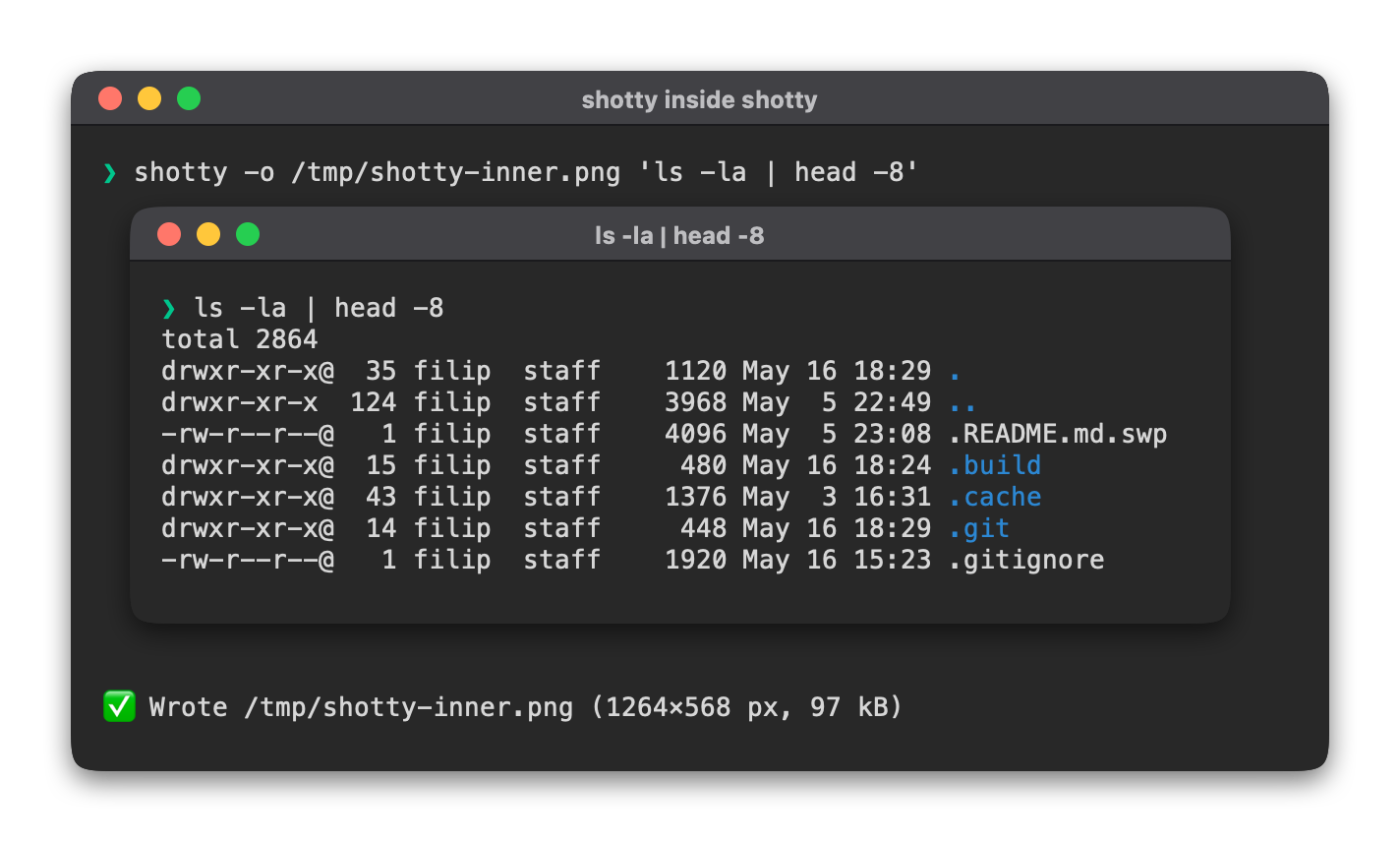
The "📸 Wrote /tmp/inner.png …" line is the inner shotty's own
status output, captured below the embedded image just like it would
appear in your real terminal.
The same composition works for any tool that emits OSC 1337 or Kitty graphics:
| Tool | What you get |
|---|---|
Another shotty |
Inner shotty's screenshot inside the outer's frame. |
imgcat <file> |
A real image inside your screenshot. |
wezterm imgcat <file> |
Same. |
kitten icat <file> |
Same. |
chafa --format=kitty <file> |
Same. |